Orphaned Disks via API in VCF Operations

VCF Operations has several Capacity related features, including the ability to reclaim Powered Off VMs and Idle VMs, remove VM Snapshots, and find Orphaned Disks. In product it looks like this (all screenshots in this blog are taken from 9.0.1).

You can export the list of Orphaned Disks via EXPORT ALL, but you can also find these in the VCF Operations API. In this case we'll be using the Internal API surface, which you can find here.

Top right select Internal APIs and go to the Internal Optimization section, which has an endpoint for GET /internal/optimization/{id}/reclaim.
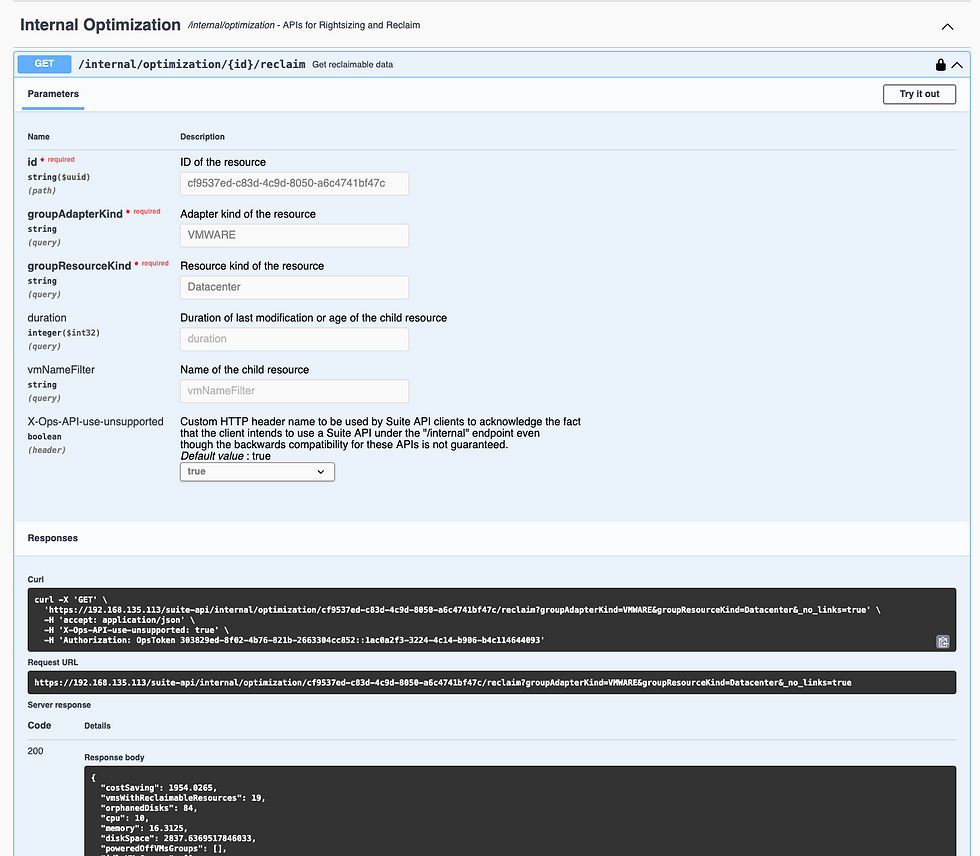
As you can see it requires three fields:
id, which is the Resource ID, in this case the Resource ID of the Datacenter you want to see Orphaned Disks for
groupAdapterKind, which is VMWARE
groupResourceKind, which will be Datacenter
We need our Datacenter ID, which we can get on the Public API surface via GET /api/resources.

Executing this and searching for the Datacenter will give you the Datacenter Resource ID.

Back in the Internal API we can now construct our call and run it using the Datacenter ID.

Scrolling down in the Response Body you'll see all of the Orphaned Disks.

Hope this was helpful!


Comments