Pull Events from the Aria Operations for Logs API

Updated: Aug 20, 2025
I wanted to pull events out of Aria Operations for Logs via API, so I started exploring the available endpoints. The Operations for Logs REST API surface can be found at: https://your_logs_fqdn/rest-api/supported, mine looks like this.
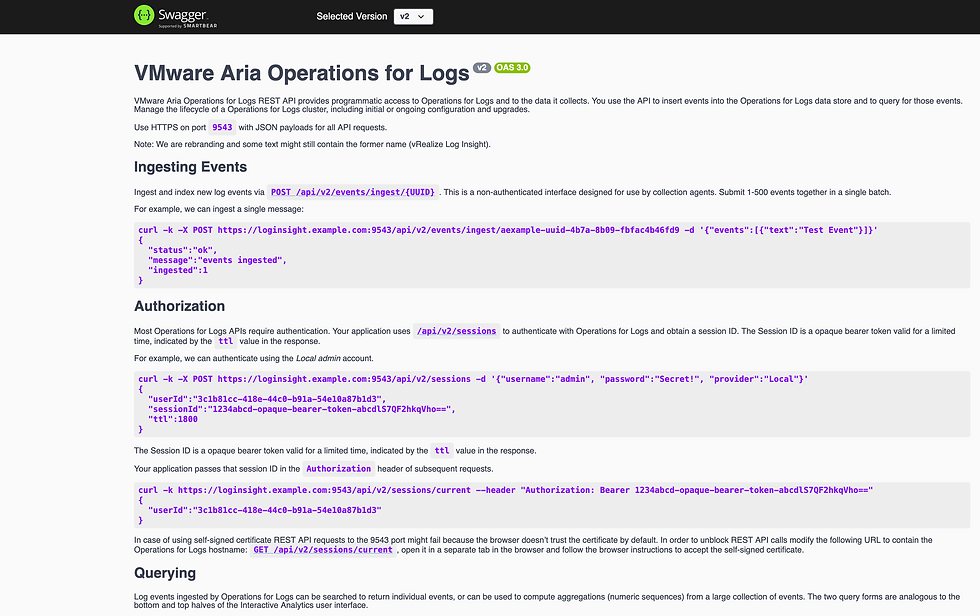
If you scroll down you'll notice there is an entire section dedicated to Querying.

As indicates, to retrieve raw log messages we can use GET /api/v2/events. Scrolling down to the events endpoint, we have this.

It's not at all clear what required field +path is, nor is it documented anywhere. But there is an example back up in the Querying section, it looked like this:
curl -k https://loginsight.example.com:9543/api/v2/events/text/CONTAINS%20Test/timestamp/LAST%20360000 --header "Authorization: Bearer 1234abcd-opaque-bearer-token-abcdlS7QF2hkqVho=="I ran something similar against my Operations for Logs instance and it returned logs as expected. I got another call to work, looking for logs where the field vc_event_type exists.
curl -k https://10.167.244.233:9543/api/v2/events/vc_event_type/EXISTS/timestamp/LAST%20360000 --header "Authorization: Bearer your_bearer_token_goes_here"I got yet another call to work looking for logs with both root and logged in them, it looked like this.
curl -k https://10.167.244.233:9543/api/v2/events/text/CONTAINS%20root/text/CONTAINS%20logged/timestamp/LAST%20360000 --header "Authorization: Bearer your_bearer_token_goes_here"
But I couldn't do much beyond this and I was just guessing at this point. I still don't know how {+path} works for GET /api/v2/events, can't find any documentation on it.
Turns out, there is a far more useful (and much more intuitive) API endpoint for querying logs, but it's Internal! I vaguely remember there being an Internal REST API, but it's not listed here.

You can find the Internal API at https://your_operations_for_logs_fqdn/rest-api/internal. Once there, scroll down to the events endpoints and you'll notice a POST /events/query which is a far more intuitive way of running queries against the Operations for Logs API.
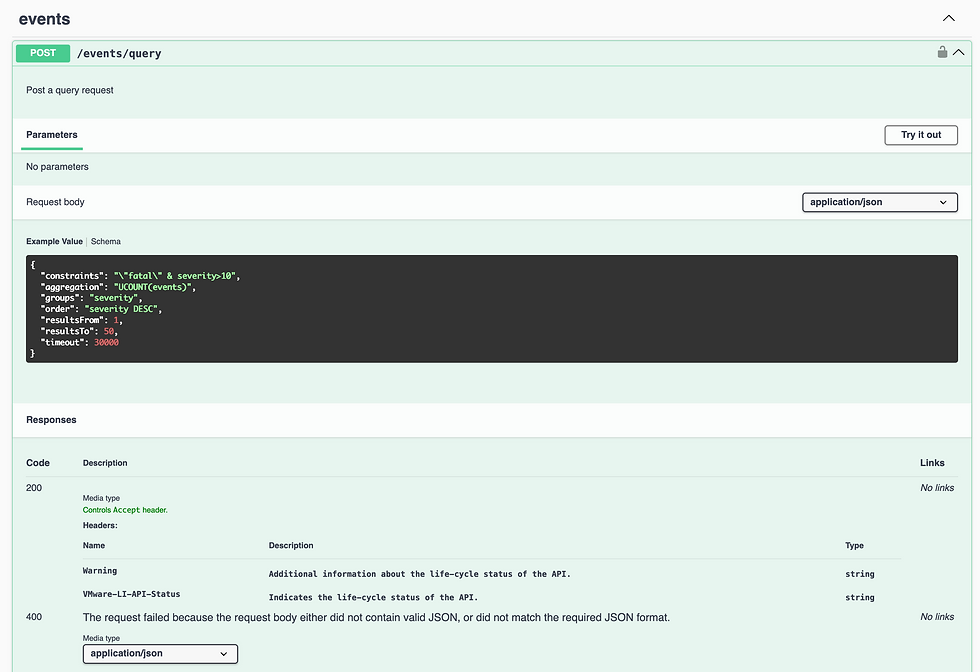
You'll notice they provide an example Request Body, let's try a few of our own. The first query we'll run is looking for text string "root" in the last 5 minutes. Here's a side-by-side of the API response and the UI.
The API Request Body looks like this:
{
 "constraints": "'root' & LastFiveMinutes",
 "aggregations": "",
 "groups": "",
 "order": "",
 "resultsFrom": 1,
 "resultsTo": 50,
 "timeout": 30000
}
A few things to note here:
constraints: effectively your query, in this case looking for events with the string "root" over the last 5 minutes
aggregation: we're not looking for aggregated results (groupings), but rather logs themselves, so leaving this empty
groups: not looking for grouping results, so leaving this empty
order: related to aggregation/groups, so leaving this empty
resultsFrom: the event to start with, 1 indicating the first
resultsTo: last event to return, 500 indicating the 500th, max is 20,000
timeout: query timeout in seconds
Here's another example looking for two different strings using the AND operations (&).
{
 "constraints": "'root' & 'logged in'",
 "aggregations": "",
 "groups": "",
 "order": "",
 "resultsFrom": 1,
 "resultsTo": 50,
 "timeout": 30000
}
Here's an example using the OR operations (|).
{
 "constraints": "'logged in' | 'logged out'",
 "aggregations": "",
 "groups": "",
 "order": "",
 "resultsFrom": 1,
 "resultsTo": 50,
 "timeout": 30000
}
Here's an example using timestamps (seconds since the Epoch).
{
 "constraints": "'error' & (timestamp > 1582675200 & timestamp < 1582761600)",
 "aggregations": "",
 "groups": "",
 "order": "",
 "resultsFrom": 1,
 "resultsTo": 50,
 "timeout": 30000
}
Here's an example searching for events with vc_event_type in the payload.
{
 "constraints": "EXISTS(vc_event_type) & LastDay",
 "aggregations": "",
 "groups": "",
 "order": "",
 "resultsFrom": 1,
 "resultsTo": 50,
 "timeout": 30000
}
Here's an examples searching for fields with certain values, over the last 48 hours.
{
    "constraints": "EXISTS(vc_username) & (vc_event_type:\"com.vmware.vim25.userloginsessionevent\" | vc_event_type:\"com.vmware.vim25.com.vmware.vim25.badusernamesessionevent\") & Last48",
    "aggregations":"",
    "groups":"",
    "order":"",
    "resultsFrom":1,
    "resultsTo":20000,
    "timeout": 30000
}
Here's an example using aggregations.
{
    "constraints":"EXISTS(vc_event_type) & LastDay",
    "aggregations":"COUNT(event)",
    "groups":"event_type",
    "order":"event ASC",
    "resultsFrom":1,
    "resultsTo":20000,
    "timeout": 30000
}
If you're looking to extract events from the Operations for Logs API, try this internal endpoint, it's powerful!


Comments