Datastore Device Backing Extent Name in VCF Operations

For years we've been trying to get the Datastore Device Backing Extent Name in VCF Operations, commonly referred to as the NAA ID. To that end, we've been working to capture this property with the vCommunity Management Pack, which we will have news on soon.
Earlier today I was discussing this with a customer and he said "you can already get that". My response was "Really, how?!". And he showed me, here's how.
To start, have a look at the Datastore Metrics provided OOTB, specifically the metrics under Devices. Selecting the Metrics tab of a Datastore will show this under the Devices dropdown.

By default, Devices will show "Aggregate of all Instances" for both vSAN and non-vSAN Datastores. If you look at the available metrics for Datastore Devices in your Policy, you'll notice there are many metrics, but none of them have Instanced State Activated. Activating just one of them gives us a pleasant surprise!

As you can see, I activated Instanced State for Write Throughput (KBps). Now back on my Datastore I have this.
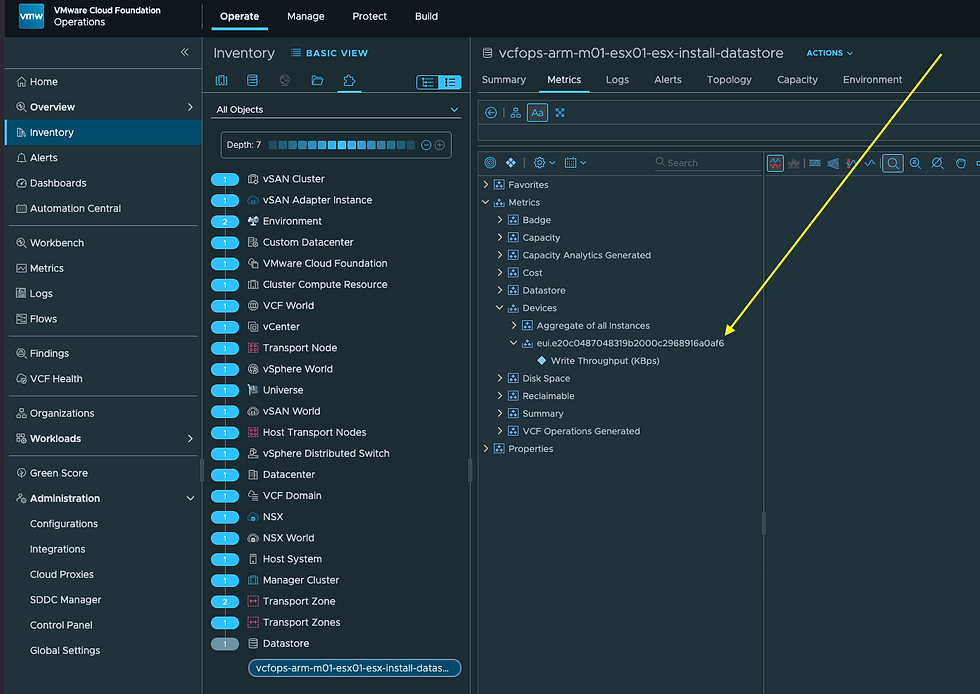
This is the Datastore Device Backing Extent (commonly referred to as the NAA ID), amazing!!! I'd prefer this as a Datastore Property, to be used in Dashboards and Views, but this is still valuable! Thanks for showing me this Matt, what an awesome surprise!
There will be more to come on this soon with the latest version of the vCommunity Management Pack, but if you're not running that Management Pack and you need the Datastore Device Backing Extent ID, this is a way to do it. Hope this was helpful, enjoy!


Comments