Integrating VCF Orchestrator with GitHub

Can I integrate VCF Orchestrator with GitHub? Yes, here's how! In this blog, I will be using my VCF Automation 8.18.1 embedded Orchestrator.
Log into VCF Automation and select the Orchestrator tile.

Once there go to Administration - Git Repositories and select ADD REPOSITORY.

Define the GitHub Repository URL, provide your Username and a Token. To generate the GitHub Repository Token log into GitHub, select your Profile top right and click Settings.

Then select Developer Settings bottom left.

Go to Personal access tokens - Tokens (classic). This also works using Fine-grained tokens.

Select the Generate new token top right and select Generate new token (classic).

Give it a Name, Expiration, and Scopes.

Scroll down and select Generate token.

Which will generate the GitHub token to be used in your Orchestrator integration.
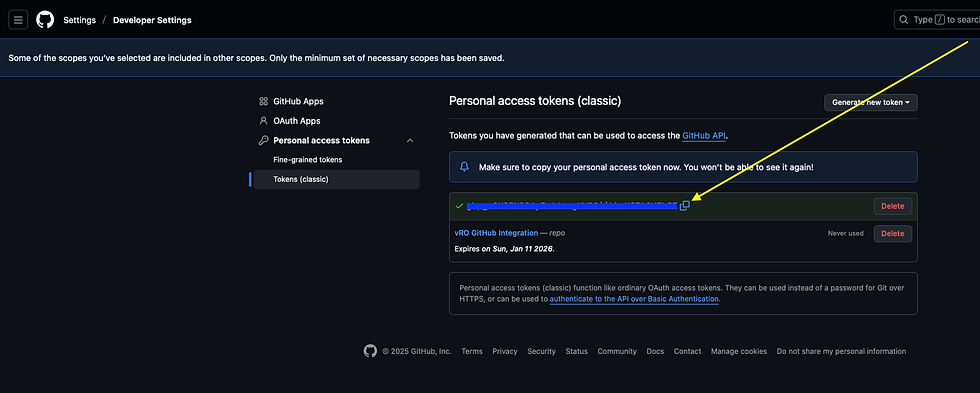
Copy this Token and use it in your Orchestrator Git Repository integration. Be sure to provide the other necessary information, including the URL to your GitHub Repository you will be syncing with.

Click VALIDATE to confirm connectivity, which you can see I've done by the "Successfully connected to..." banner in the screenshot above. Click SAVE to save it.

Once saved and validated it will show as an Active Git Repository integration.
Next go to Administration - Git History to initiate any PUSH/PULL requests.

Let's Push adjusted Workflows to our GitHub Repository.

Select the Workflows you'd like to Push and click PUSH at the bottom.

Once complete it will look like this. Over in your GitHub Repository you will notice a new Folder for Workflows.

Looking in that Folder you will see the Workflows we just pushed.

You can do this same thing for Orchestrator Actions. Here I've Pushed the createSnapshot_v2 Action (createSnapshot_v2.xml) from Orchestrator to GitHub.

I then adjusted the error being thrown in the xml from my GitHub Repository.

I then initiated a Pull Request from Orchestrator which picks up the changes on GitHub and shows them.

Going to Orchestrator Library - Actions and looking at the createSnapshot_v2 Action itself we can see the differences.

If you want to start using the newly pulled Action, select VERSION, provide details and click PUSH which will publish this new 0.2.1 version.

Looking at your createSnapshot_v2 Action you'll now see this.

You'll notice your Orchestrator Action Script now has the adjusted error being thrown (as adjusted in GitHub).

Version History also provides your version history side by side.

There is so much you can do with VCF Orchestrator and the GitHub integration, hope this helps!


Comments