VCF Operations 9.1 List AD Groups and Users via API

I have a VCF Operations 9.1 deployment using vIDB 9.1 to broker Identity and Access Management with Active Directory. I wanted to list AD Groups and Users via API, here's how I did it.
First, log into VCF Operations to create your API Client and Token. I detailed how to do this a couple different ways previously:
I've created my API Client and Token here.

Now exchange that API Token for a Bearer Token to be used against the Operations API.
curl -k --request POST \
--url https://vcf-m02-vidb01.mdgvlabs.com:443/acs/t/CUSTOMER/token \
--header 'content-type: application/x-www-form-urlencoded' \
--data grant_type=urn:custom:vcf:params:oauth:grant-type:api-token \
--data api_token=your_api_token_goes_here
This will return your Bearer Token.
{"scope":"user","access_token":"your_bearer_token_will_be_here","token_type":"Bearer","expires_in":1799}
You will use this Bearer Token to authenticate with the Operations API.
If you're using the Swagger API for authentication you can do this.

If you're making API calls via cURL/Postman they'll look like this.
curl -X 'GET' \ 'https://vcf-m02-ops01a.mdgvlabs.com/suite-api/api/actiondefinitions?page=0&pageSize=1000&_no_links=true' \ -H 'accept: application/json' \ -H 'Authorization: Bearer your_bearer_token_goes_here'
We will now look for our SSO Realm which can be found via an IAM API.

I love Swagger because it also gives us the cURL command being run which you can use command line if you'd like. The response to this is the following.

We now have the VCF SSO Realm Id (first one listed above) to run subsequent commands. Let's first get our AD Groups.
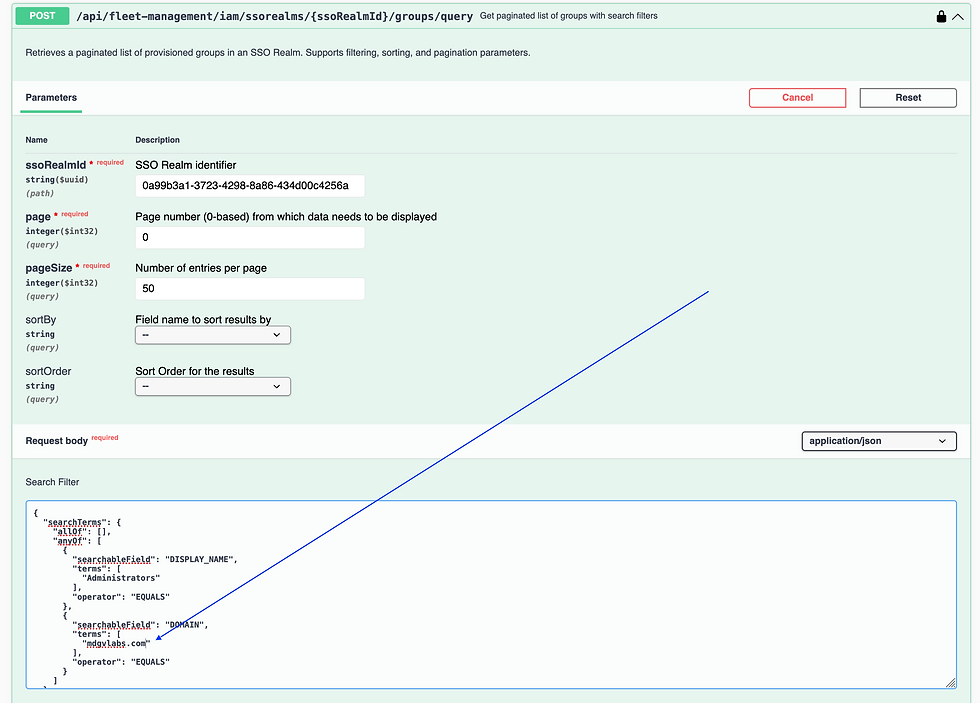
Notice, the default for the searchableField DOMAIN is broadcom.com, you'll have to change this to reflect your DOMAIN. My output looks like this.
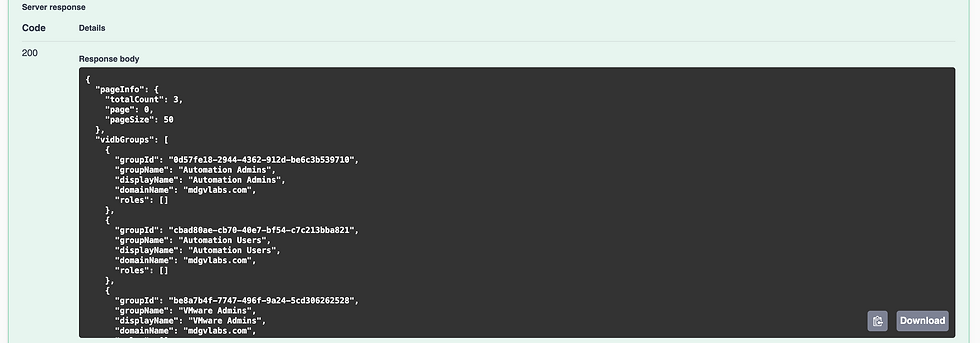
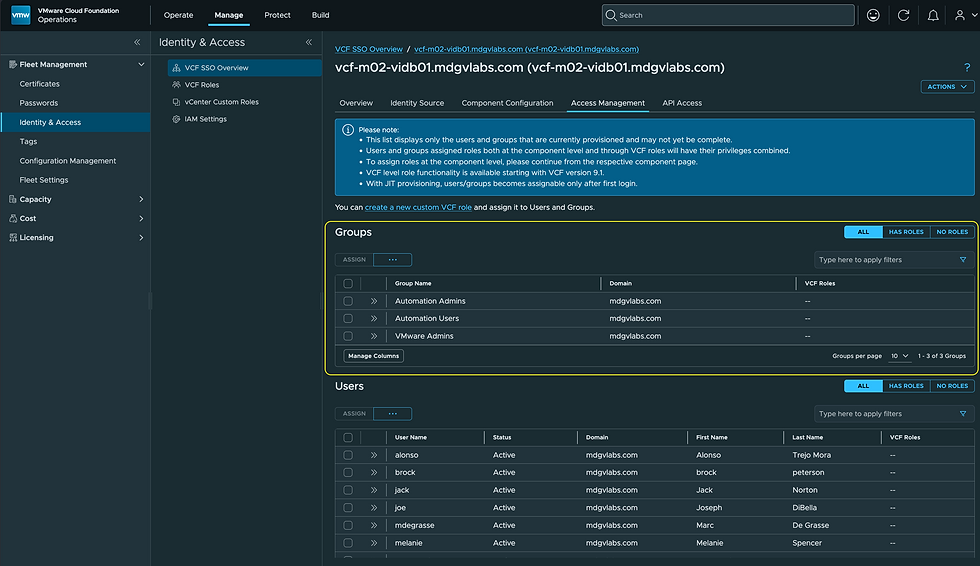
You'll notice 3 Groups: Automation Admins, Automation Users, and VMware Admins, which map to what we see in the UI.
Now that we have our SSO Realm ID and Group ID we can capture Users in that Group. In this case I'm listing the Users in the Automation Admins Group. Notice, you'll need to adjust the DOMAIN again here as broadcom.com is the default.

The cURL command looks like this:
-H 'accept: application/json' \
-H 'Authorization: Bearer your_bearer_token_goes_here' \
-H 'Content-Type: application/json' \
-d '{
"searchTerms": { "allOf": [], "anyOf": [ { "searchableField": "DISPLAY_NAME", "terms": [ "Administrators" ], "operator": "EQUALS" }, { "searchableField": "DOMAIN", "terms": [ "mdgvlabs.com" ], "operator": "EQUALS" } ] } }'
My response looks like this.

Which corresponds to the Group Users.

Hope this was helpful, enjoy!


Comments