VCF Operations Log Management 9.1.1 Data Sets

We discussed Operations for Logs Data Sets a few years ago, but it's changed since then, so let's take another look.
VCF 9.1 changed the Logs architecture significantly. Logs went from being its own Cluster of VMs to a service running on the VCF Management Services Cluster. It no longer has its own UI, but rather is accessed via the VCF Operations UI. This changed how Logs Data Sets are configured as well.
Logs Data Sets are a construct used to filter what VCF Operations users can see for logs, let's create one. Log into the VCF Operations UI and go to Operate - Administration - Control Panel - Access Control Scopes - ADD.
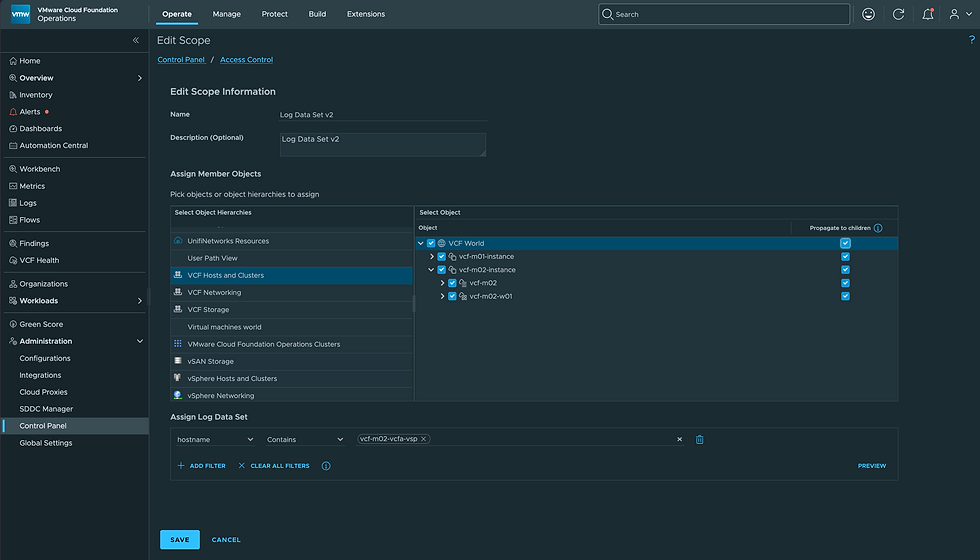
I've chosen VCF Hosts and Clusters at left and VCF World at right (including Propogate to children), so all VCF object types are assigned. Next I created a filter for the Data Set that contains all logs with hostname contains vcf-m02-vcfa-vsp. Once done click SAVE.
Next I went to Control Panel - User Accounts - ADD and created a User with the Logs Data Set v2 Scope. That user can access Operations, but will only see Logs data against the defined Scope.

Once logged in as that user, I can now confirm I only see Logs for the assigned Scope (defined by the Data Set).

As shown, I only see Logs for hostname contains vcf-m02-vcfa-msp. This is the new way to define Logs Data Sets (as of VCF 9.1). Hope this was helpful, enjoy!


Comments