VCF Operations 9.1 Webhook Payloads including Symptoms

If you read the VCF Operations 9.1 Release Notes carefully you noticed the following:
The behavior of the ${SYMPTOMS} placeholder in webhook notification payload templates has changed
In 9.1, the ${SYMPTOMS} placeholder was redesigned from a plain string to a structured JSON object representing symptom sets, conditions, and related context. As a result, ${SYMPTOMS} can no longer be embedded inline with other variables or text within the same JSON value.
For correct usage, place ${SYMPTOMS} as a dedicated key-value pair:
"symptoms": "${SYMPTOMS}". Embedding the ${SYMPTOMS} placeholder within a larger text string, such as "description": "Alert description:${ALERT_DEFINITION_DESCRIPTION} \n\nSymptoms: ${SYMPTOMS}", is no longer supported.
So, what does this actually look like? In my case, I have a Webhook Plugin configured against the ServiceNow Incident API (opening Incidents). The Webhook Payload Template looks like this:

You'll notice the following: "work_notes_list": "${SYMPTOMS}". I'm setting the ServiceNow Incident field work_notes_list to the value of ${SYMPTOMS}.
Based on the changes in VCF Operations 9.1, this now looks like this in ServiceNow.

Not ideal. So, let's create a custom field in the Incident Form we'll push the Symptom value to and parse it.

Right click in the Incident Banner, go to Configure - Form Layout.

Give the custom field a name, I called mine u_symptoms, all custom fields must start with u_. Click SAVE.
I then built a ServiceNow Business Rule to make this more readable.
{definedOn=self, symptoms=[{name=Guest file system space usage at warning level, resourceName=vcfa-mgmt-vwr8m, resourceId=ff42b643-e51e-4a1f-87cc-793cae7d90e0, metricName=guestfilesystem:/|percentage, messageInfo=100.0 > 90.0}, {name=Guest file system space usage at critical level, resourceName=vcfa-mgmt-vwr8m, resourceId=ff42b643-e51e-4a1f-87cc-793cae7d90e0, metricName=guestfilesystem:/|percentage, messageInfo=100.0 > 95.0}], conditions=[]}]
Go to the All dropdown in ServiceNow and search for System Definition.

Select Business Rules.
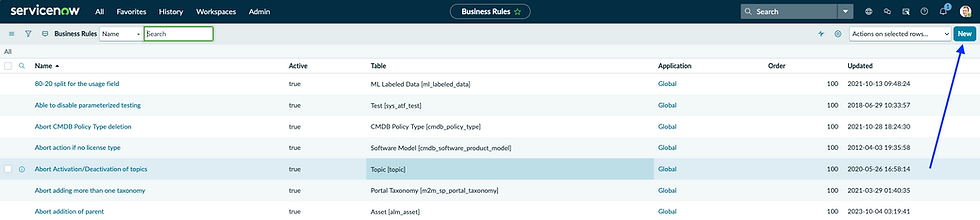
Click New.

Give it a Name, point it at the Incident Table, confirm that it's Active, select the Advanced checkbox, and configure the "When to run" tab. I'm running it before a table insert, but other options are available.
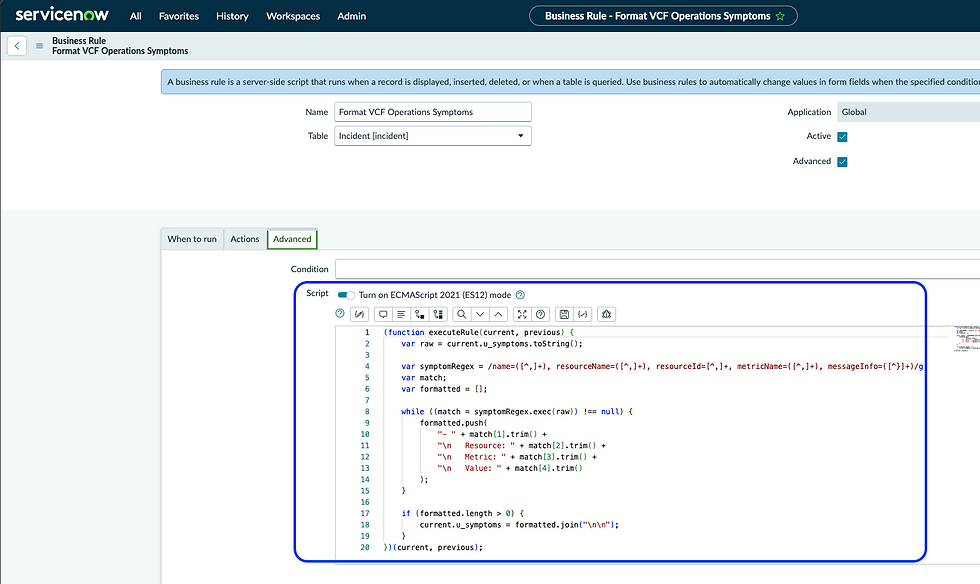
In the Advanced tab call this script which will re-configure the SYMPTOM value to be much more readable. Once complete click Submit. If you'd like this code you can get it here.
We now have a new custom field in our Incident Forms in the Incident Table and a Business Rule to massage it. Let's configure our VCF Operations Webhook Payload Template to use the new custom field.

Notice the "u_symptoms": "${SYMPTOMS}" assignment, this is what assigns the VCF Operations SYMPTOMS value to the newly created u_symptoms field in the ServiceNow Incident table.

Now when a VCF Operations Alert generates a Webhook Notification to ServiceNow, the ServiceNow Incident will look this. Notice how nicely formatted the Symptoms field is now. Hope this was helpful, enjoy!


Comments