VM Downtime with VCF Operations Super Metrics
- Brock Peterson

- Mar 19
- 2 min read
We blogged about VM downtime a while back. That blog introduced a Super Metric that calculated VM downtime in minutes based on a 5m collection interval. I'd like to do something similar for VM downtime in hours and days, but I don't want to show those metrics with decimal values, but rather as integers. For example, if a VM has been down 3.2 hours I'd like to show that as 3 hours. Similarly, if a VM has been down for 1.6 days I'd like to show that was 1 day until it's actually down for 2 full days. Here's how I did it.
First, I took the original metric and adjusted the amount of time I was adding to it on each interval based on hours or days. The original Super Metric looked like this.
{This Resource: sys|poweredOn} == 1 ? 0 : {This Resource: Super Metrics|VM Down Duration (Minutes)} + 5If the VM is up, the value is 0, if not the value gets incremented on each data collection cycle (assuming the default of 5m).
To create VM Downtime in hours I adjusted the 5m to .083333h, which is 5m/60m. That Super Metric looks like this.
{This Resource: sys|poweredOn} == 1 ? 0 : ({This Resource: Super Metrics|VM Down Duration (Hours)} + .083333)To create VM Downtime in days I adjusted the 5m to .003472d, which is 5m/1440m. That Super Metric looks like this.
{This Resource: sys|poweredOn} == 1 ? 0 : ({This Resource: Super Metrics|VM Down Duration (Days)} + .003472)These Super Metrics work fine and sum the VM downtime in hours and days respectively, but remember I want integers based on the last hour/day passed. To do this I created two more Super Metrics leveraging the floor() function. The Super Metric for VM downtime in hours represented as an integer looks like this.
floor({This Resource: Super Metrics|VM Down Duration (Hours)})The Super Metric for VM downtime in days represented as an integer looks like this.
floor({This Resource: Super Metrics|VM Down Duration (Days)})If you want the Super Metrics they can be found on my GitHub Repository here.
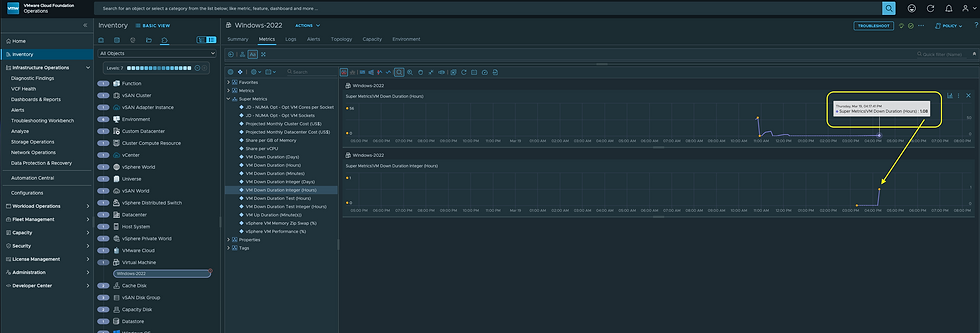
I tested to be sure they were working as expected, this is what they show for a VM that has been down for just over an hour. Exactly, what I wanted.
Hope this was helpful, enjoy!


Comments