VCF Operations Dashboard Recovery

Looking to recover a mistakenly deleted VCF Operations Dashboard I discovered Dashboard backups on my Analytics Nodes. Specifically, they can be found in the following directory on every Analytics Node in your Operations Cluster:
/storage/db/vcops/dashboard_dumpFrom within there will be a directory for each Dashboard Owning User, mine looked like this.
root@vcfops-135-110 [ /storage/db/vcops/dashboard_dump ]# ls -latr
total 16
drwxr-xr-x  4 admin admin 4096 Jul 14 15:50 .
drwxr-xr-x 14 admin admin 4096 Aug  4 12:07 ..
drwxr-xr-x  2 admin admin 4096 Aug 22 15:52 c3af0008-cf43-4f09-94bc-b79b2bccd4fe_brockp_LOCAL
drwxr-xr-x  2 admin admin 4096 Aug 22 15:52 8ba8b3dc-f7d0-42e2-8479-7572da06b3d0_admin_LOCAL
Exploring the admin owned Dashboards you'll see this.
root@vcfops-135-110 [ /storage/db/vcops/dashboard_dump/8ba8b3dc-f7d0-42e2-8479-7572da06b3d0_admin_LOCAL ]# ls -latr
total 12716
-rw-r--r-- 1 admin admin 632213 Jun 26 15:49 '2026-06-26 03-49-31 PM.zip'
-rw-r--r-- 1 admin admin 632215 Jun 29 15:49 '2026-06-29 03-49-44 PM.zip'
-rw-r--r-- 1 admin admin 632213 Jul  2 15:49 '2026-07-02 03-49-54 PM.zip'
-rw-r--r-- 1 admin admin 632212 Jul  5 15:50 '2026-07-05 03-50-01 PM.zip'
-rw-r--r-- 1 admin admin 632213 Jul  8 15:50 '2026-07-08 03-50-09 PM.zip'
-rw-r--r-- 1 admin admin 632213 Jul 11 15:50 '2026-07-11 03-50-19 PM.zip'
drwxr-xr-x 4 admin admin   4096 Jul 14 15:50  ..
-rw-r--r-- 1 admin admin 638194 Jul 14 15:50 '2026-07-14 03-50-29 PM.zip'
-rw-r--r-- 1 admin admin 639065 Jul 17 15:50 '2026-07-17 03-50-37 PM.zip'
-rw-r--r-- 1 admin admin 639059 Jul 20 15:50 '2026-07-20 03-50-46 PM.zip'
-rw-r--r-- 1 admin admin 641782 Jul 23 15:50 '2026-07-23 03-50-57 PM.zip'
-rw-r--r-- 1 admin admin 643106 Jul 26 15:51 '2026-07-26 03-51-09 PM.zip'
-rw-r--r-- 1 admin admin 643109 Jul 29 15:51 '2026-07-29 03-51-19 PM.zip'
-rw-r--r-- 1 admin admin 643101 Aug  1 15:51 '2026-08-01 03-51-29 PM.zip'
-rw-r--r-- 1 admin admin 643705 Aug  4 15:51 '2026-08-04 03-51-40 PM.zip'
-rw-r--r-- 1 admin admin 643704 Aug  7 15:51 '2026-08-07 03-51-51 PM.zip'
-rw-r--r-- 1 admin admin 643359 Aug 10 15:51 '2026-08-10 03-51-58 PM.zip'
-rw-r--r-- 1 admin admin 664636 Aug 13 15:52 '2026-08-13 03-52-10 PM.zip'
-rw-r--r-- 1 admin admin 664635 Aug 16 15:52 '2026-08-16 03-52-19 PM.zip'
-rw-r--r-- 1 admin admin 665226 Aug 19 15:52 '2026-08-19 03-52-43 PM.zip'
-rw-r--r-- 1 admin admin 665225 Aug 22 15:52 '2026-08-22 03-52-55 PM.zip'
As you can see, Dashboards are being backed up internally every 3 days. If you've lost a Dashboard and wish to recover it you can SCP one of these ZIP files down, then import it via Dashboards - Manage - Import. Note: these ZIP files are not importable via Content Management.
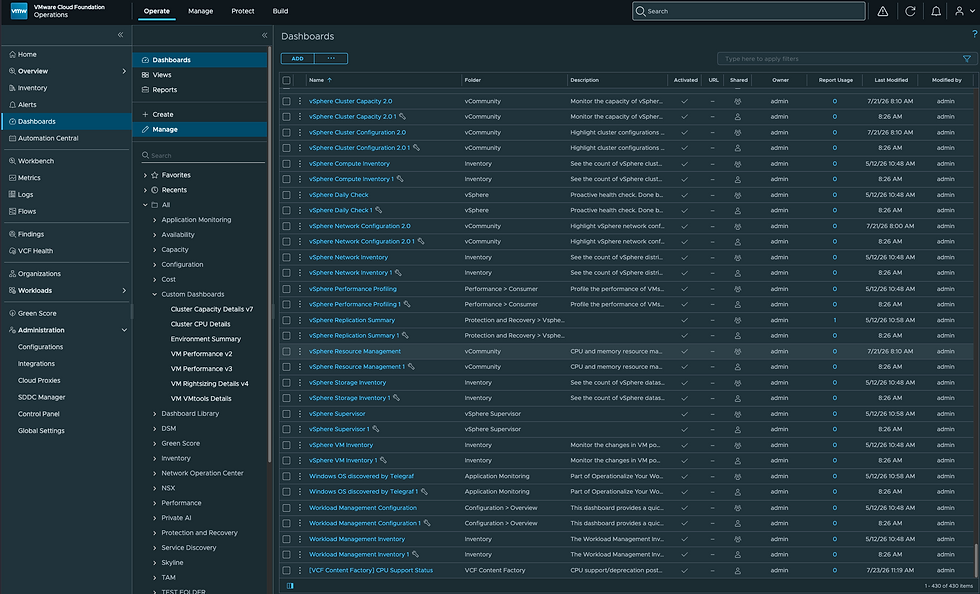
One drawback here is that you'll be importing all Dashboards in the ZIP file (which in this case is all Admin-owned Dashboards). You can choose to overwrite existing Dashboards or Rename the imported Dashboards (which will append a 1) to the name. You will then find the deleted Dashboard you were trying to restore (it won't have a 1 appended to it). You can delete the others that were imported along with it (they'll have a 1 appended to their name), as shown here. All screenshots here are taken from VCF Operations 9.1.
Orphaned Content available in Operate - Administration - Control Panel - Orphaned Content can be used for Dashboards whos owner has been removed from Operations itself, but if you've lost a Dashbaord entirely, try the method I described above.
Thanks to my colleague Matt Goodnow for refreshing my memory on this one. Hope it was helpful, enjoy!


Comments