Upgrade Aria Operations 8.18.3 to VCF Operations 9.0 via Aria Suite Lifecycle Manager

Updated: Aug 20, 2025
In our previous blog we discussed upgrading Aria Operations 8.18.3 to VCF Operations 9.0 via the Admin UI. Here we will show how to do it via the Aria Suite Lifecycle Manager. Let's go!
First, Aria Suite Lifecycle Manager will need to be at 8.18.1 Patch2, which you can get here. Once downloaded, SCP it to the ASLCM VM and put it in /data. After that, it'll be available for application from the ASLCM UI. Go to Lifecycle Operations - Settings - Binary Mapping. - Patch Binaries.

Configure /data as your Source Location, click DISCOVER and it'll find the patch you just uploaded. Select it and click ADD. You can watch progress here.

Next go to Settings - System Patches - NEW PATCH and follow the prompts.
It installs pretty quickly and will reboot the VM. Once back up, we'll confirm it's been applied via the About page.

You can also see in Settings - Product Support Pack that VCF Operations 9.0 is now supported.

Next we'll SCP the VCF Operations 9 upgrade binary to /data on the ASLCM VM. Then go to Settings - Binary Mapping - ADD BINARIES.

Select Local, /data for the Base Location, click DISCOVER which will find the recently uploaded binary. Select it and click ADD. You can watch progress here.

Once done we're ready to apply it. Go to Environments, select your environment, and go to the Operations tab.

Click UPGRADE and PROCEED.

Click NEXT.

Click RUN ASSESSMENT.

Review the assessment and click NEXT.

Click the option to take a Snapshot and click NEXT.

Provide the necessary inputs and click NEXT, this is the information for the new VCF Operations Fleet Management VM.

Click NEXT and run the pre-check.

We have some failures, specifically we're missing the Fleet Management binaries and the IP address we're going to use for it isn't resolving. First, let's add the Fleet Management binaries to ASLCM. Download them from here, SCP them up to /data on the ASLCM VM, then add them.

Click ADD and watch progress here.

Once done let's re-run our pre-check. I also fixed my unresolved IP issue.

Click NEXT then SUBMIT!

Now we watch.

After 20m or so, it errored out indicating SSH needed to be enabled on the Operations Node/s.

So I went over the Operations Admin UI and enabled SSH.

Back in ASLCM, click re-try and you'll be on your way. After about an hour we're done!

Back in your original ASLCM environment you'll notice the Operations tab is now gone.

VCF Operations UI now looks like this.

Upon login, you'll notice CEIP has been enabled.

You can disable it in Administration - Global Settings - System Settings if you want.

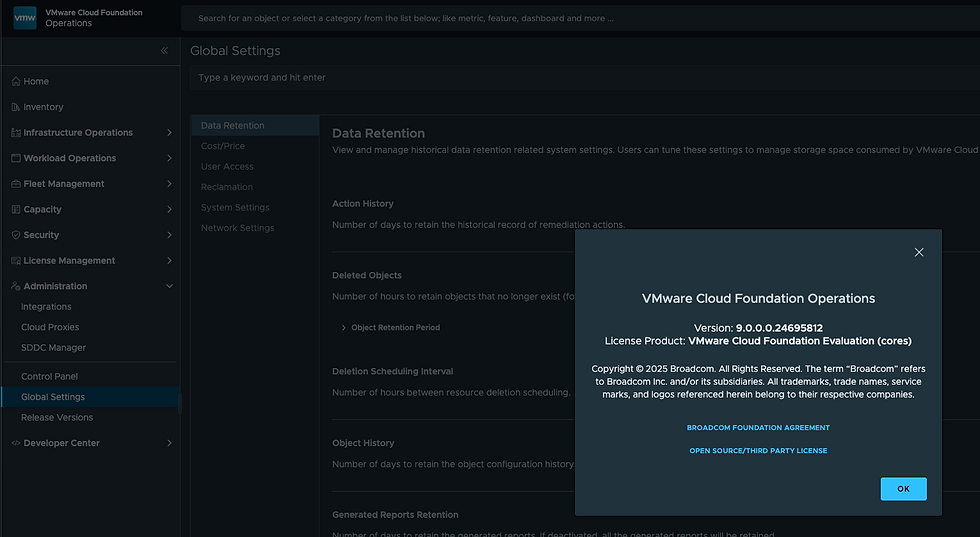
The About page will now show you're at VCF Operations 9.0!
There is more to do here including integration with the Fleet Manager, deploy of a fresh Operations for Logs, application of the new license, and more, I'll blog about those next.


Question: Is it correct that the upgrade shown here is performed on a non-VCF deployment, meaning all Aria components were manually deployed via Aria Suite Lifecycle Manager?