VCF Operations API Methods for Multiple Metrics/Properties

Updated: May 17
I had a list of VMs and a list of Metrics/Properties I wanted to pull from the VCF Operations API, here's how I did it.
A few API endpoints are relevant here, the first will get us our list of VMs, it is GET /api/resources.
curl -X 'GET' \ 'https://your_ops_fqdn_goes_here/suite-api/api/resources?resourceKind=VirtualMachine&page=0&pageSize=1000&_no_links=true' \ -H 'accept: application/json' \ -H 'Authorization: OpsToken your_token_goes_here'
Output from this call will include a list of VMs, all with an identifier, this is the VM identifier.

The next API endpoint will get us our list of Metrics, I wanted to capture these:
VM Power State (Summary - System - Powered On). API statKey is sys|poweredOn
VMware Tools Status (Guest - Tools Running Status (%)). API statKey is guest|tools_running_status
Snapshot Count (Summary - Number of Snapshots). API statKey is summary|snapshot_count
Snapshot Size (Summary - Snapshot Space). API statKey is summary|snapshot_space_used
To find these Metric statKeys I used GET /api/resources/statkeys. Provide it with the resourceId (identifier) of a VM in question to get a list of available statKeys.
curl -X 'GET' \
'https://your_ip_goes_here/suite-api/api/resources/statkeys?resourceId=your_resourceId goes here&_no_links=true' \
-H 'accept: application/json' \
-H 'Authorization: your_ops_token_goes_here'
Output from this call will include all avaiable Metric statKeys for that VM.

The next API endpoint will get us our list of Properties, I wanted to capture these:
VM Power State (Summary - Runtime - Power State). API name is summary|runtime|powerState
VMware Tools Status (Summary - Guest Operating System - Tools Running Status). API name is summary|guest|toolsRunningStatus
vDS Port Group (Network - 4000). API name is net:4000|portGroup
vSphere Tag (Summary - vSphere Tag). API name is summary|tagJson
Snapshot Age (Disk Space - Snapshot - Age). API name is diskspace|snapshot|snapshotAge
Requires Snapshot Consolidation (Configuration - Requires Snapshot Consolidation). API name is config|disk_consolidation_needed
To find these Property names I used GET /api/resources/properties. Provide it with the resourceId (identifier) of a VM in question to get a list of available names.
curl -X 'GET' \
'https://your_ip_goes_here/suite-api/api/resources/properties?resourceId=your_resourceId_goes_here&_no_links=true' \
-H 'accept: application/json' \
-H 'Authorization: OpsToken your_token_goes_here'
Output from this call will include all available Property Names for that VM.
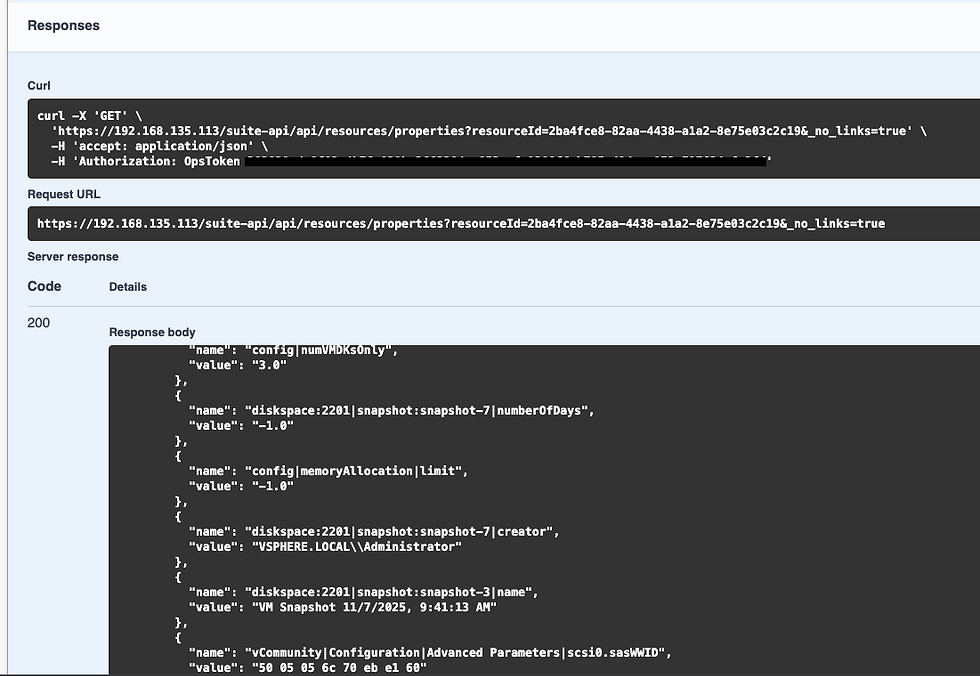
We now have a list of our VMs, Metrics, and Properties. We need to call two different APIs to get their latest values.
Metrics - GET /api/resources/stats/latest
Properties - GET /api/resources/properties/latest/query
The call for Metric values will look like this.
curl -X 'GET' \
-H 'accept: application/json' \
-H 'Authorization: OpsToken your_ops_token_here'
The response will include your Metric values.

The call for Properties will look like this.
curl -X 'POST' \
'https://your_ip_goes_here/suite-api/api/resources/properties/latest/query?_no_links=true' \
-H 'accept: application/json' \
-H 'Authorization: OpsToken your_token_goes_here' \
-H 'Content-Type: application/json' \
-d '{
"resourceIds": [
"your_resourceId1_goes_here",
"your_resourceId2_goes_here"
],
"propertyKeys": [
"summary|runtime|powerState",
"summary|guest|toolsRunningStatus",
"summary|runtime|connectionState",
"net:4000|portGroup",
"summary|tagJson",
"diskspace|snapshot|snapshotAge",
"config|disk_consolidation_needed"
],
"instanced": false
}'
The response will include your Property values.

We now have a way to capture a list of Metrics and Properties against a list of VMs via the VCF Operations API. You could write a script using these API endpoints, or you could ask your assistant (Claude) for a little help.
I asked Claude to write me a Shell Script to do all this for me. I requested three input files:
List of VMs
List of Metrics
List of Properties
Within 6-7 prompts I had a working prototype, you can get it here if you want. It required the following packages (which of course Claude told me about) on my Linux VM:
curl - already installed
jq - had to install
python - already installed
I installed jq with these commands (which Claude provided):
curl -L -o /usr/local/bin/jq https://github.com/jqlang/jq/releases/latest/download/jq-linux-amd64
chmod +x /usr/local/bin/jq
Once the script was finished, I uploaded it to my VM (you must edit the script to include your Operations URL and authentication credentials (line 44)). I then ran it and it looks like this:
root@vr8183-bpeterson [ /tmp ]# ./vcf_ops_shell.sh vms.txt metrics.txt properties.txt
[16:17:12] Authenticating to VCF Operations at https://192.168.135.113...
[16:17:12] Authentication successful.
[16:17:12] Loaded 2 VMs, 4 metrics, 7 properties.
[16:17:12] Fetching metrics for all VMs...
[16:17:12] Metrics fetched successfully.
[16:17:12] Processing VM: a781eccb-f489-4461-888a-e1699329a334
[16:17:12] Name: vrslcm-bpeterson
[16:17:12] Fetching properties...
[16:17:13] Processing VM: efb1f535-ac3c-4453-a144-54693c497399
[16:17:13] Name: vra-bpeterson
[16:17:13] Fetching properties...
[16:17:14]
[16:17:14] ============================================
[16:17:14] COMPLETE
[16:17:14] VMs processed : 2
[16:17:14] Metrics : 4
[16:17:14] Properties : 7
[16:17:14] JSON output : vcf_ops_results_20260517_161712.json
[16:17:14] CSV output : vcf_ops_results_20260517_161712.csv
[16:17:14] ============================================
Checking the output:
root@vr8183-bpeterson [ /tmp ]# cat vcf_ops_results_20260517_161712.json
[
{
"resourceId": "a781eccb-f489-4461-888a-e1699329a334",
"vmName": "vrslcm-bpeterson",
"metrics": {
"guest|tools_running_status": 100.0,
"sys|poweredOn": 1.0,
"summary|snapshot_space_used": 43.308387756347656,
"summary|snapshot_count": 1.0
},
"properties": {
"summary|runtime|powerState": "Powered On",
"summary|guest|toolsRunningStatus": "Guest Tools Running",
"summary|runtime|connectionState": "connected",
"net:4000|portGroup": "VM Network",
"summary|tagJson": "none",
"diskspace|snapshot|snapshotAge": "76.0",
"config|disk_consolidation_needed": "false"
}
},
{
"resourceId": "efb1f535-ac3c-4453-a144-54693c497399",
"vmName": "vra-bpeterson",
"metrics": {
"guest|tools_running_status": 66.66666666666667,
"sys|poweredOn": 1.0,
"summary|snapshot_space_used": 112.93119812011719,
"summary|snapshot_count": 1.0
},
"properties": {
"summary|runtime|powerState": "Powered On",
"summary|guest|toolsRunningStatus": "Guest Tools Running",
"summary|runtime|connectionState": "connected",
"net:4000|portGroup": "VM Network",
"summary|tagJson": "none",
"diskspace|snapshot|snapshotAge": "65.0",
"config|disk_consolidation_needed": "false"
}
}
]
Amazing, just amazing! The power of the VCF Operations API along with AI, I hope this was helpful!


Comments