Post-Deployment Actions with VCF Automation

In our last several blogs we've discussed VCF Automation related topics.
Today we'll cover post-deployment actions with VCF Automation by calling Orchestrator Workflows via Subscriptions. Specifically, I'd like to request VMs via the Service Broker Catalog and have a VM Snapshot taken (or not) after the build, before the Application teams start installing things. Here's how I did it.
I created a Blueprint and published it to the Service Broker Catalog, it looks like this. If you'd like the Blueprint, you can get it here.

I'm asking for all sorts of things from the consumer, including if they'd like a Snapshot of the VM once it's been deployed. I'll use this input later as a Subscription Condition.
I then created an Orchestrator Workflow to extract the necessary properties from the Deployment and take a Snapshot. It looks like this.

The first Scriptable Task (Set Script Properties) takes input from the VCFA Deployment and outputs the VM ID, vCenter ID, and Snapshot Name.

The second Action Element (getVcenterVMbyID) takes the vmId and vcId from the Scriptable Task as input and outputs the VM.

The third Action Element (createSnapshot) takes the vm and other inputs and outputs a vCenter Task.

The fourth Action Element (vim3WaitTaskEnd) just waits for the vCenter Task to end.

Next I created a Subscription via Assembler - Extensibility - Subscriptions. Subscriptions are a way to run Orchestrator Workflows (or ABX Actions) based on VCFA Events like Compute Allocation, Compute Post Provision, etc. Mine looks like this.

The Event Topic is Compute Post Provision, which means the attached Workflow (or ABX Action) will be run once the Compute Post Provision Event is seen by the Subscription. You'll notice I have a Condition set on this Subscription.

I'm filtering on the vm_snapshot Custom Property, if the user chose YES at request time a Snapshot will be taken, otherwise one won't.
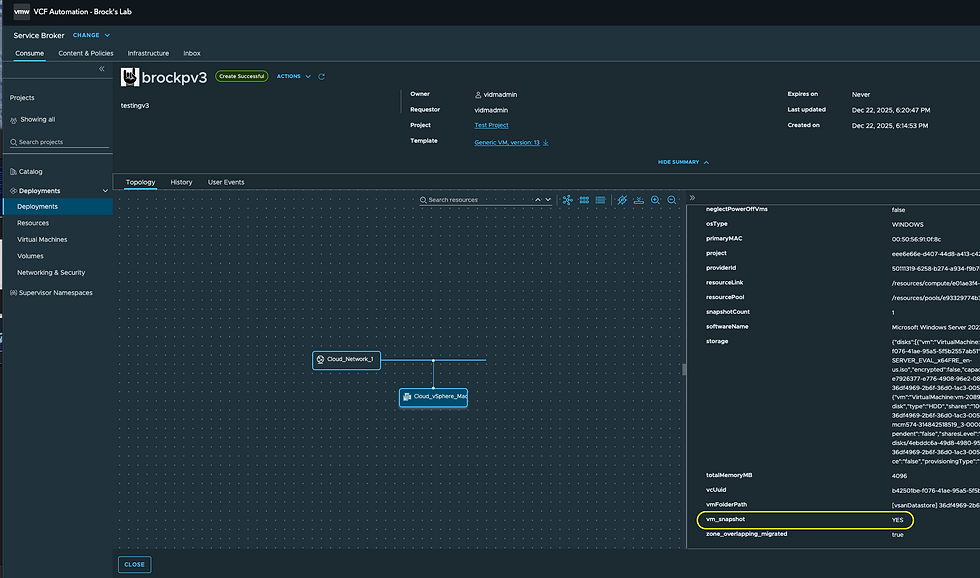
Looking at a VCFA Deployment you can confirm your Custom Attribute is being set properly be inspecting the Custom Properties.
It's being set in my Blueprint like this.

Keep in mind that Properties set in your Blueprint show as Custom Properties on your VCFA deployments.
Let's test this by requesting a VM.

You'll notice I selected YES for a Snapshot here. Once done it will look like this.

Notice the Custom Property vm_snapshot was YES, which means the user asked for a Snapshot to be taken. Checking in vCenter, we have our Snapshot.

Next, let's request a VM without a Snapshot.

Once complete we'll check the Custom Property of the VCFA Deployment.

Notice the Custom Property vm_snapshot is NO. Our Subscription should skip this Deployment because of that.

Sure enough, our new VM doesn't have a Snapshot as requested. Subscriptions and Orchestrator Workflows are powerful constructs, with all sorts of use cases, use them!
Thanks to my colleague Nestor Almanza for his invaluable insight on this blog and Orchestrator Workflows in general!


1 Comment