VCF Operations Content Export and Import

We've discussed exporting/importing content from VCF Operations a couple times:
I'd like to highlight a few things here when individually exporting/importing VCF Operations content. All screenshots here are taken from VCF Operations 9.0.2.
The first use case is almost always Dashboards, and it needs to be highlighted that Dashboard exports do NOT include underlying Views. For example, let's export this Dashboard.

To export this Dashboard I go to Infrastructure Operations - Dashboards & Reports - Dashboards - Manage and export it.
The export will be a ZIP file. If I import this Dashboard into another VCF Operations instance it'll look like this.

This is because the Dashboard export doesn't include any underlying Views, those must be exported manually as well. Let's do it.

Now go to the target VCF Operations environment and import the View.
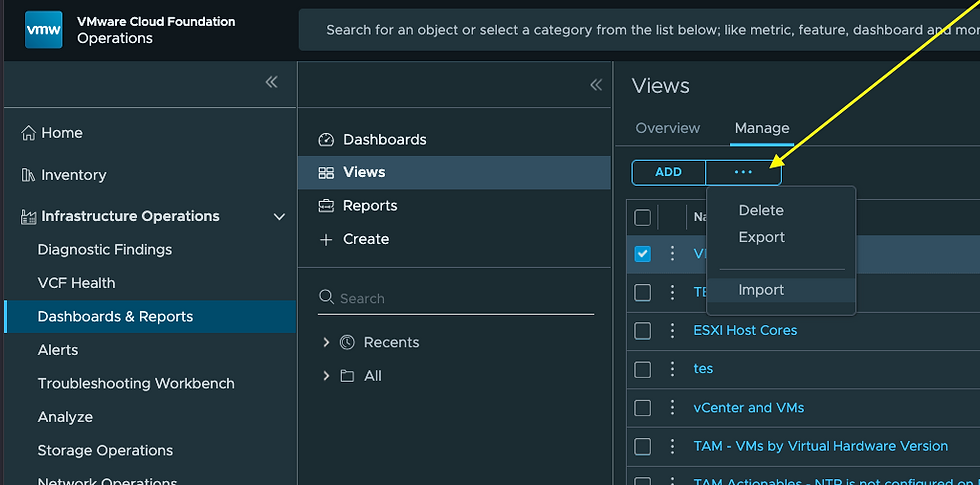
The Dashboard on the target environment now looks like it should.

Keep this in mind when exporting/importing Dashboards, I've seen dozens of users run into this in the wild.
This is NOT how Reports and/or Alert Definitions work, when you export a Report the View comes with it. Lets export this VM Report.
Exporting the Report gives us a ZIP file, which we will then import into the target environment.

Upon import you'll be presented with this.

You'll notice there is a new Report and View now.
There are times a Report is using a View that already exists on the target environment, the import will fail with this error.
In this case, just select Overwrite existing Report Template, which is in fact overwriting the existing View/s.

The third most common export/import use case is for Alert Definitions. Thankfully, for Alert Definitions based on Symptom Definitions, the Symptom Definitions get exported along with the Alert Definition. Here's an example.

Exporting this Alert Definition generates an XML file. Inspecting the XML, you can actually see the Symptom Definition.
<?xml version="1.0" encoding="UTF-8"?><alertContent>
<AlertDefinitions>
<AlertDefinition adapterKind="VMWARE" disableInBasePolicy="true" id="AlertDefinition-58b1c241-1379-46a5-af5a-bcb4af69c6c1" name="VM OS Mis-Match" resourceKind="VirtualMachine" subType="19" type="15">
<State severity="automatic">
<SymptomSet applyOn="self" operator="and" ref="SymptomDefinition-46fef28a-4f64-4729-b602-be52540eb8af"/>
<Impact key="health" type="badge"/>
</State>
</AlertDefinition>
</AlertDefinitions>
<SymptomDefinitions>
<SymptomDefinition adapterKind="VMWARE" disableInBasePolicy="true" id="SymptomDefinition-46fef28a-4f64-4729-b602-be52540eb8af" name="VM Guest OS Mis-Match" resourceKind="VirtualMachine">
<State severity="info">
<Condition key="config|guestFullName" operator="!=" targetKey="summary|guest|fullName" thresholdType="property" type="property" value="" valueType="string"/>
</State>
</SymptomDefinition>
</SymptomDefinitions>
</alertContent>
Upon import in the target environment, it looks like this.
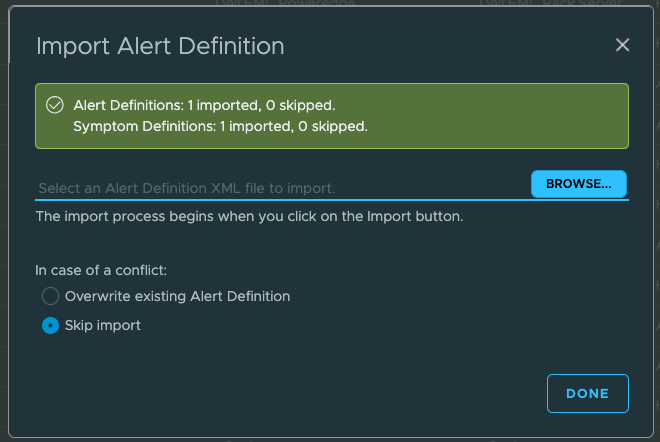
Very nice response too, indicating the Alert Definition and underlying Symptom Definition have been imported. If there were multiple Symptom Definitions and/or Recommendations used in your Alert Definition it would look like this.

After importing Alert Definitions remember to enable them in the Policy/s you want, forgetting this part is quite common. Hope this was helpful!


Hi Brock! Ever since I the export capability was around in Ops, this was bugging me. Any clue why this has not been fixed by now for the Dashboard ex- and import? I cannot understand the thinking behind why someone would ever export a dashboard. but withouts its containing views....